
Catch building code compliance issues during design
What building code compliance looks like during design
Most building code compliance issues are discovered at plan check — when they are expensive to fix and delay permitting.
By that point, the design is already set. Fixing one issue means reworking multiple systems, redrawing sheets, and going back through coordination.
A different approach is emerging.
This approach — known as model-based building code compliance— evaluates code requirements directly inside the BIM model during design.
How building code compliance works inside the model
Instead of reviewing drawings after the fact, teams run building code compliance checks directly inside Revit.
Kestrel translates building code, local amendments, and regulatory requirements into structured logic that runs against the model.
This is made possible by building code compliance software for Revit that operates inside the design environment.
Each check:
evaluates the model against applicable code requirements
flags issues tied to specific elements
cites the exact code section behind each violation
Checks run in seconds and can be repeated continuously throughout design.
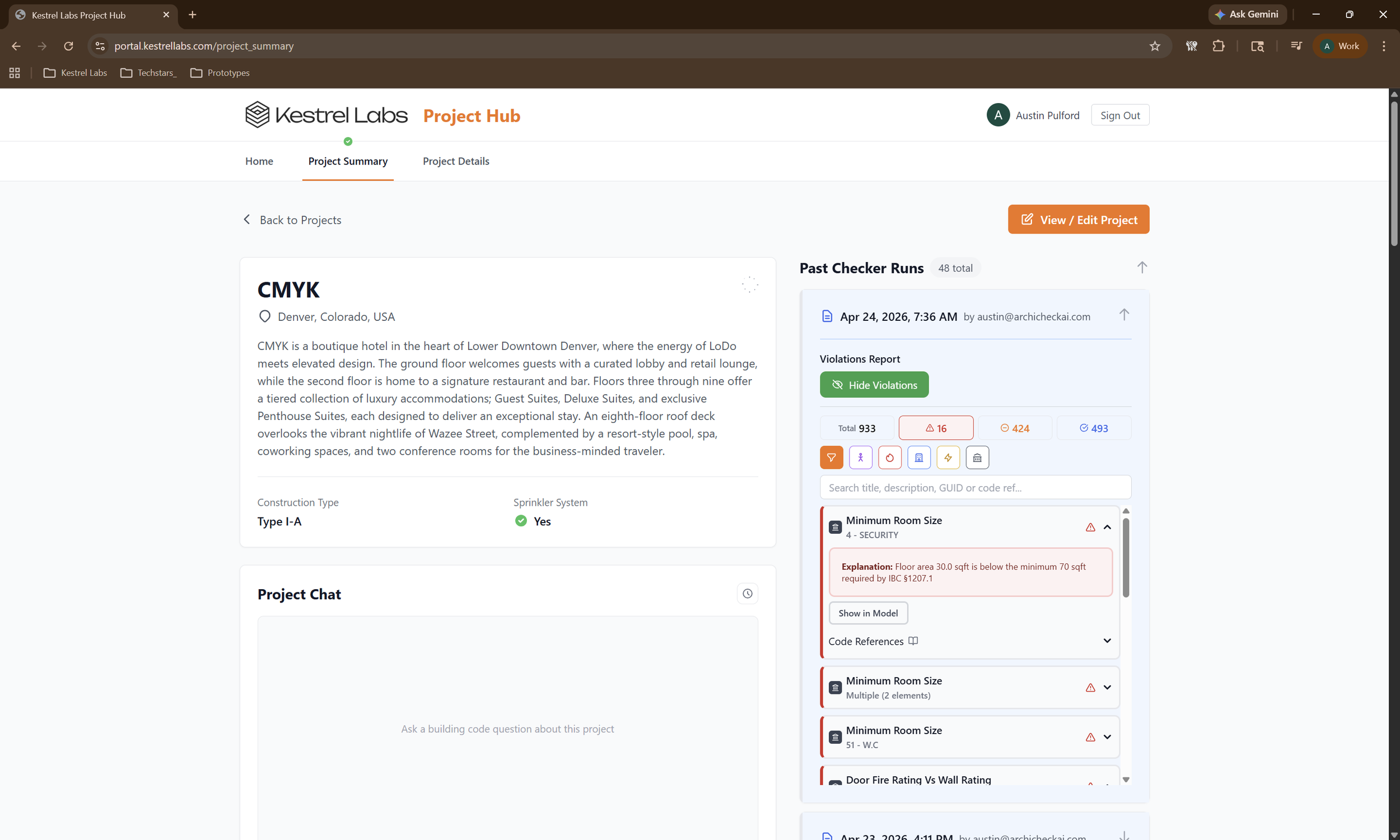
Kestrel evaluates building code compliance directly inside the Revit model, surfacing violations with explanations and cited code references across the project.
What changes when compliance moves into the model
A compliance check that used to take hours of manual review now takes seconds.
More importantly, it happens earlier.
Instead of discovering issues at plan check, teams surface them during design development — when they are still easy to fix.
This shift — from checking after drawings are complete to evaluating compliance continuously — is part of a broader move toward model-based building code compliance in BIM.
You can see how this shift is playing out across the industry in our breakdown of how building code compliance is moving into the model.
How this compares to traditional workflows
Most compliance workflows still rely on:
manual interpretation of code
PDF-based plan review
late-stage QA/QC
These approaches catch issues — but only after design decisions are locked.
Today, teams are starting to move toward tools that check compliance directly in the model.
If you’re evaluating what’s available, we break down the landscape of tools for building code compliance in Revit. (3)
Why this matters
When compliance runs during design:
issues surface earlier
rework is reduced
permitting timelines become more predictable
Instead of reacting to plan check comments, teams design with compliance in mind from the start.
That changes how risk is managed across the project.
Where this is going
BIM became the system of record for design over the last two decades.
Compliance is the last major workflow that hasn’t fully followed it into the model.
The tools — and the underlying code data, built on licensed sources including International Code Council (ICC) data — now exist to make that shift possible.
Kestrel is part of a new category of model-side tools reshaping how compliance gets handled, and has already been recognized in programs like the Trimble 0-60 Challenge.
Kestrel is building that compliance layer — translating building code into structured logic that runs directly inside the Revit model.
If you want to see how this works in your own model:
