
How Building Code Compliance Is Moving Into the BIM Model
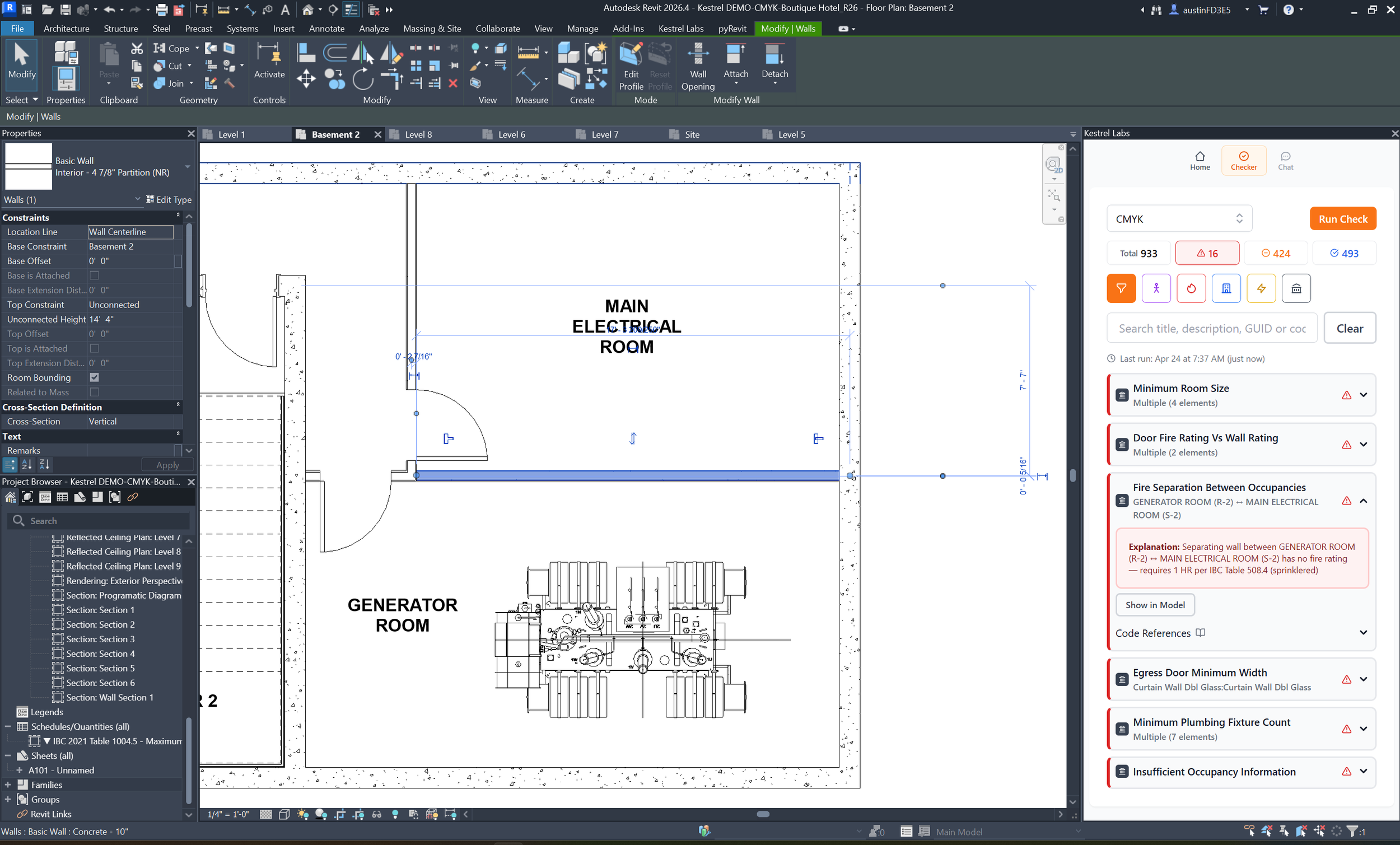
Kestrel runs building code compliance checks directly inside the Revit model, flagging issues and linking them to specific code sections.
For most of architectural practice, building code compliance has lived outside the model.
Codes sit in PDFs. Checks happen manually, when there's time for them. Issues surface at plan check — after decisions have already compounded. By then, an egress problem isn't a wall you move. It's the corridor, the room layouts, the door schedule, and the sheets built on top of it.
This is the standard workflow. It's also the expensive one.
This shift is often referred to as model-based building code compliance.
The shift that's already happening
In a 2026 survey of the AEC QA/QC landscape, Slantis identified a new class of tools changing how compliance gets handled.
"Instead of treating accessibility, fire separation, or zoning review as something that only happens at the end, these tools surface issues while the model is still being developed."
That's the shift.
Compliance moving from a downstream check to a continuous part of the design process — what we describe as model-based building code compliance — running inside the Revit model, not alongside it.
It’s possible now because BIM made it possible. When design lives in a structured model, compliance can be evaluated against that structure directly. Building code stops being a document to interpret and becomes structured logic that can be evaluated directly against the BIM model.
This is now being enabled by building code compliance software for Revit that runs directly in the design environment.
What this means in practice
A building code compliance check that used to take hours of manual cross-referencing now takes about 30 seconds with a Revit code compliance tool.
Every flagged issue is tied to the exact element in the model and cited to a specific code section. Teams run checks continuously — after a design review, before a client meeting, while testing options — instead of saving it for the end.
The result isn't just faster compliance. It's a different relationship with risk. Issues that would have surfaced at plan check surface during design development, when fixing them is still cheap.
Why it matters for the whole team
The conversation about compliance tooling usually centers on the architect doing the work. But the shift to in-model compliance changes things for the whole team.
Project managers can track compliance status across projects without opening a BIM file. Principals can see where a set stands before it goes out. Everyone works from the same picture instead of waiting on a redline.
That visibility has always been missing. A compliance problem discovered at plan check is visible to everyone immediately. A compliance problem that could have been caught in design development is invisible until it isn't.
Where this is going
BIM became the system of record for design over the last two decades. Compliance is the last major workflow that hasn't followed it into the model.
The tools and the underlying code data — built on licensed sources, including International Code Council (ICC) data — now exist to change that.
If you’re exploring how different approaches compare, we break down the current landscape of tools for building code compliance in Revit.
Kestrel is building that compliance layer — translating building code into structured logic that runs directly inside the Revit model.
If you want to see what it finds in your model, schedule a demo →
