
What Tools Exist for Building Code Compliance in Revit?
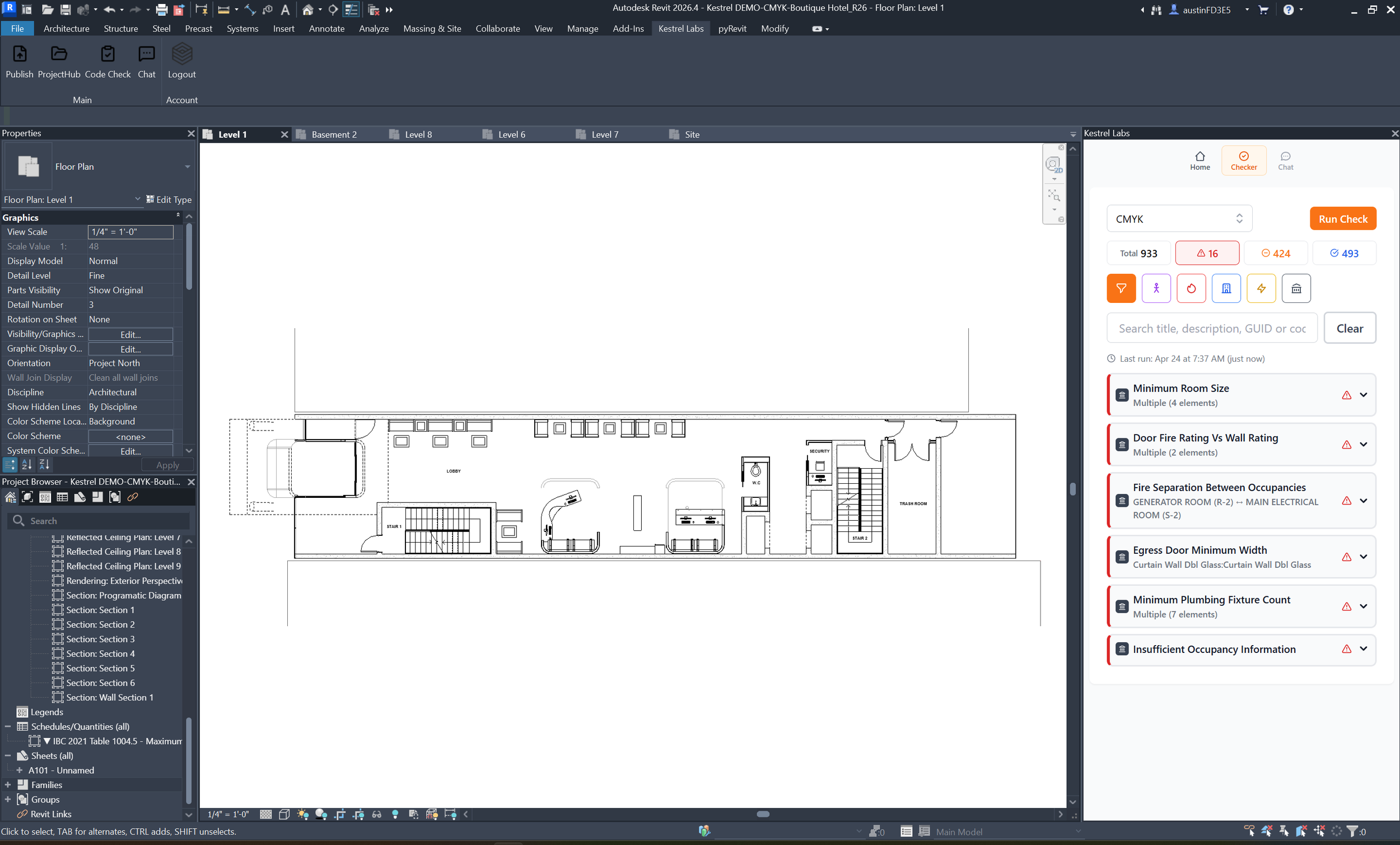
Building code compliance tools working inside Revit, surfacing issues across categories like fire separation, egress, and occupancy in real time.
Architects have been asking a version of the same question for years: is there software that checks building code directly inside Revit?
The answer is now yes — but the landscape is still taking shape.
If you're new to the concept, this approach is often referred to as model-based building code compliance — evaluating code directly against the BIM model during design.
Model-side checkers (inside Revit)
These tools evaluate the BIM model directly, flagging issues related to geometry, parameters, and code requirements. This is the category seeing the most active development.
As described in recent QA/QC research by Slantis, model-side tools are shifting compliance earlier into the design process — surfacing issues while the model is still being built rather than at submission.
This shift toward checking code during design is what’s driving the move to building code compliance software for Revit that runs directly inside the model.
Kestrel is an example of this approach. It runs compliance checks inside Revit, mapping every flagged issue to the exact element in the model and citing the specific code section behind it. Checks take about 30 seconds and can be run continuously throughout design.
PDF plan review tools
These tools analyze exported drawing sets, catching inconsistencies across sheets and coordination issues.
Useful — but they operate after design decisions are already locked.
This is the traditional plan check workflow, where compliance is verified at the end instead of during design.w
Custom scripts and general AI workflows
Some firms build internal tools to check specific standards or use general AI systems to interpret code.
Often powerful, but require ongoing setup, maintenance, and manual validation. Most are not directly integrated into the BIM model itself.
The key difference
The key difference between these categories is timing.
PDF tools check after design. Model-side tools check during design.
That difference determines whether a compliance issue costs five minutes or five weeks.
This shift — from checking after drawings are complete to evaluating compliance continuously — is what defines the move toward model-based building code compliance in BIM.
Where to explore further
Kestrel is listed on AEC+Tech with a full overview of what it checks, how pricing works, and how to get started.
You can also see how compliance is moving into the model in practice in our breakdown of how building code compliance is shifting into the BIM model.
The category is still early — but the direction is clear.
If you want to see what this looks like in your own model, See what Kestrel finds in your model →
