
Manual
[01]

No way to check code directly against the model
You spend hours, days reading the code, to figure out what applies, and check it against the design by hand.

Kestrel runs inside your BIM environment and flags code issues early — before your plans reach the building department.

Partners:











Built on official code data through our collaboration with the International Code Council (ICC). Continuously updated.
[ Problem ]
Checking compliance manually means issues stay hidden until they're disruptive, costly, and time-consuming to fix.
Manual
[01]
You spend hours, days reading the code, to figure out what applies, and check it against the design by hand.
Disjointed
[02]

Every time you stop to check code, you lose the thread. So checks happen less often than they should.
Compounding
[03]

Missed requirements don't stay small, growing with every decision built on top.
Costly
[04]

Hours or weeks of rework. Lost fees. Permit delays hitting developers with $12,000 in daily carrying costs.
[ What's Checkable ]

Architects carry the compliance obligation from concept through submission. Reading, interpreting, and applying code requirements at every stage.
That work happens outside the design itself, forcing you to step away from creative flow and revisit compliance in fragments.
Kestrel brings compliance into the design process, showing what passes and what doesn't, as you work, so you're not surprised at submission.
[ How It Works ]
Your model.
Your codes.
Connected.
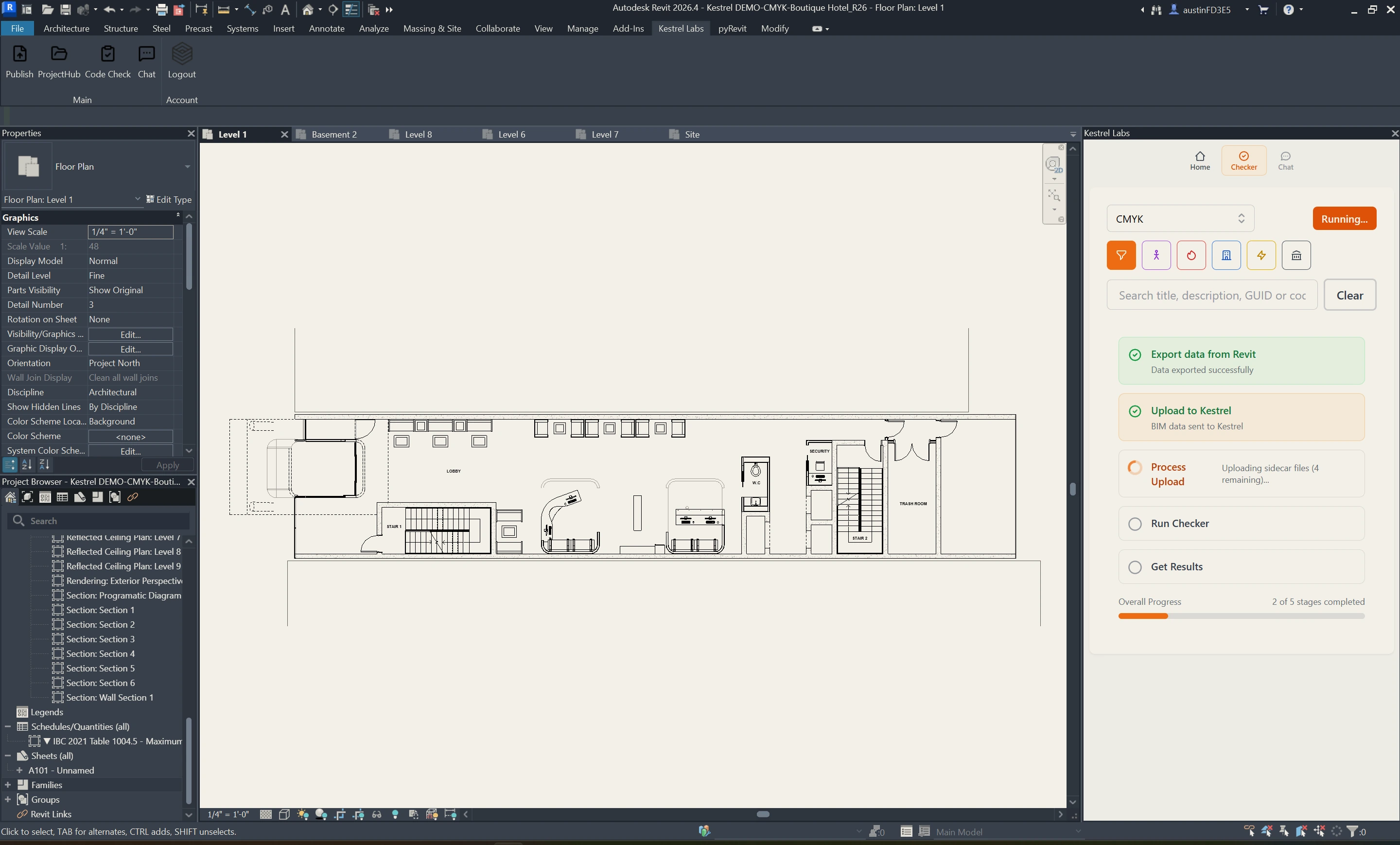
One click in your BIM model. Kestrel applies the codes for your project type and jurisdiction, mapping results to the exact elements in your design. Every issue is tied to a cited code reference. You know exactly what to fix and why.
01
Kestrel works inside Revit: no new tools, no workflow changes
02
Checks specific code requirements against your BIM model
03
Shows what's wrong, where it occurs, and why
04
Links every issue back to the code section it comes from
[ Kestrel // Revit live check ]
Basement 02 · IBC 2021 · Frame 01
Kestrel doesn't replace your judgment. It gives you something worth judging.
[ Two Products, One Workflow ]
Kestrel Compliance Analysis identifies code violations directly in your BIM model. Kestrel Compliance Chat explains them — grounded in the same project, the same code section.
Active Reference
IBC 2021 · Table 716.1(2)
Door Fire Rating vs Wall Rating
Kestrel Compliance Analysis
[01]
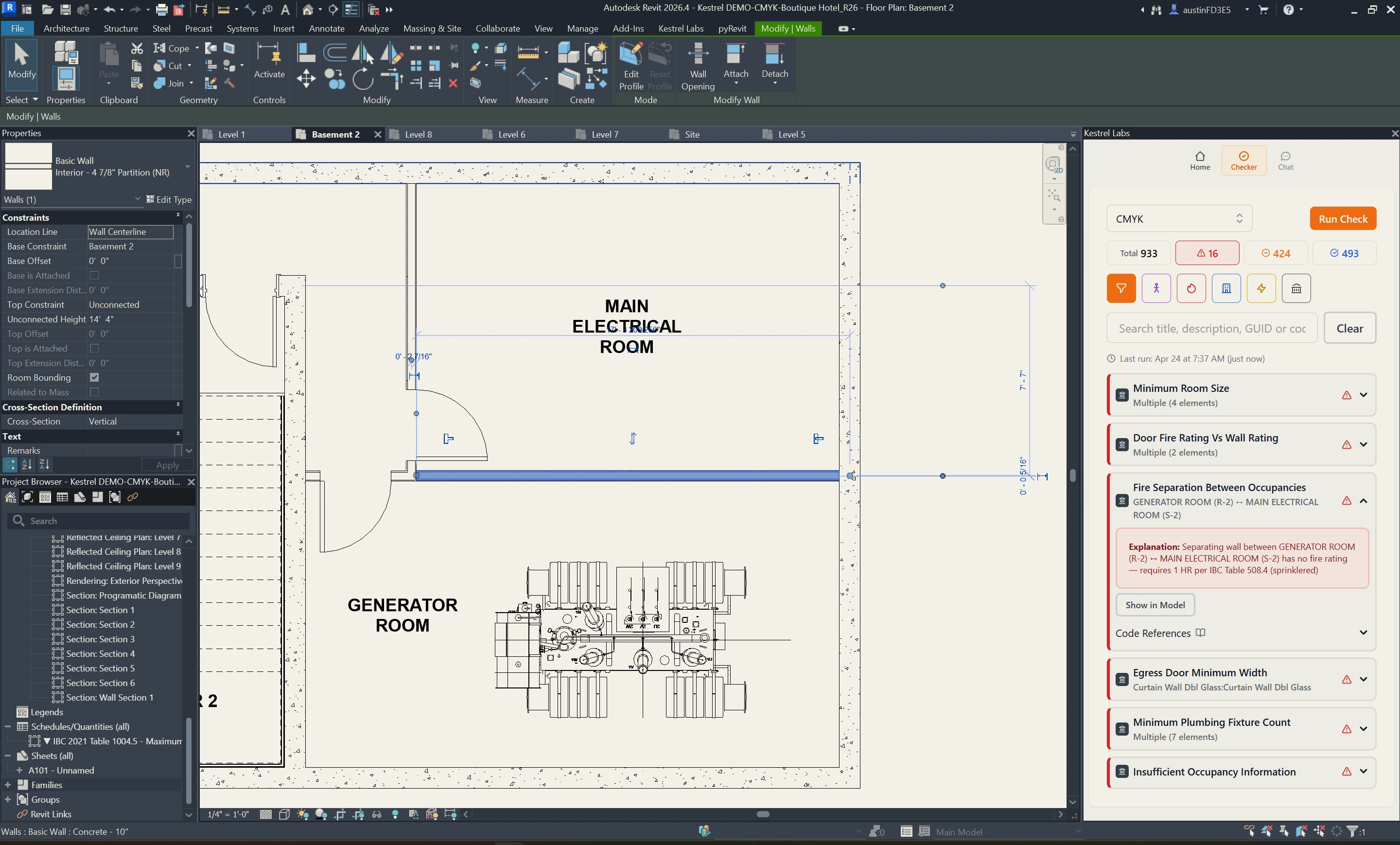
Continuous compliance checks against your BIM model. Every violation tied to a specific element, with the cited code section behind it.
Kestrel Compliance Chat
[02]
Built into the same workflow. Project-specific code answers grounded in your model's occupancy and conditions, cited to source.
[ Design Phases ]
From the first program sketch through the last RFI, Kestrel works with how you already design — applying the right code lens at every stage.
Concept / Pre-Design
[01]
Before a wall is placed, Kestrel helps you understand the code parameters you're designing into — occupancy classifications, height and area limits, and jurisdictional constraints that will shape every decision downstream.
Schematic Design
[02]
Occupancy, egress, and life safety constraints — caught while the design is still easy to change.
Design Development
[03]
Accessibility, clearances, and fire safety — resolved before they're locked into your drawings.
Construction Documents
[04]
Full compliance review before the set goes out. Your first submission is your best submission.
Construction Administration
[05]
When field questions arise, you already know where you stand on code. No surprises. No unexpected Change in Services.
[ Compliance Infrastructure ]


[ Use Cases ]
Check compliance continuously in your BIM model, so issues surface during design: not at submission.
Catch accessibility, egress, and clearance issues early, before they turn into redesign.
Permit delays can cost tens of thousands a day. Kestrel catches compliance issues during design, well before they become your problem at submission.
Run comprehensive checks across applicable codes in a fraction of the time of manual review.
Spend reviewer time on judgment calls, not checklist items. Submissions arrive pre-checked against your jurisdiction's requirements.

