Kestrel Labs

[ The Kestrel Platform ]

Building code compliance, built into your BIM model.

Kestrel checks your Revit model against the codes for your project and jurisdiction in about 30 seconds. Every result lands on the element it came from, with the section cited. No PDF, no export, no round trip.

Now in Autodesk Forma and your browser, too.

Run it yourself, in the browser →

Architectural collage — a low-slung white modernist pavilion at the water's edge under a large white moon, framed by pines against a flame-orange band.
International Code Council (ICC) Code Connect API

Built on official code data via our ICC collaboration. When ICC updates, you get an update.

[ Continuous Compliance ]

Continuous code compliance during design

Most compliance tools check a static PDF after the design is done. You print the set, send it out, wait for comments, then go find every one in the model. Kestrel checks the live model while you're designing it.

Kestrel translates building code into structured logic applied directly to your BIM model. One click is all it takes.

The earlier issues surface, the less there is to fix.

[ Key Features ]

How Kestrel works inside your design process

How AI building code compliance works in Revit

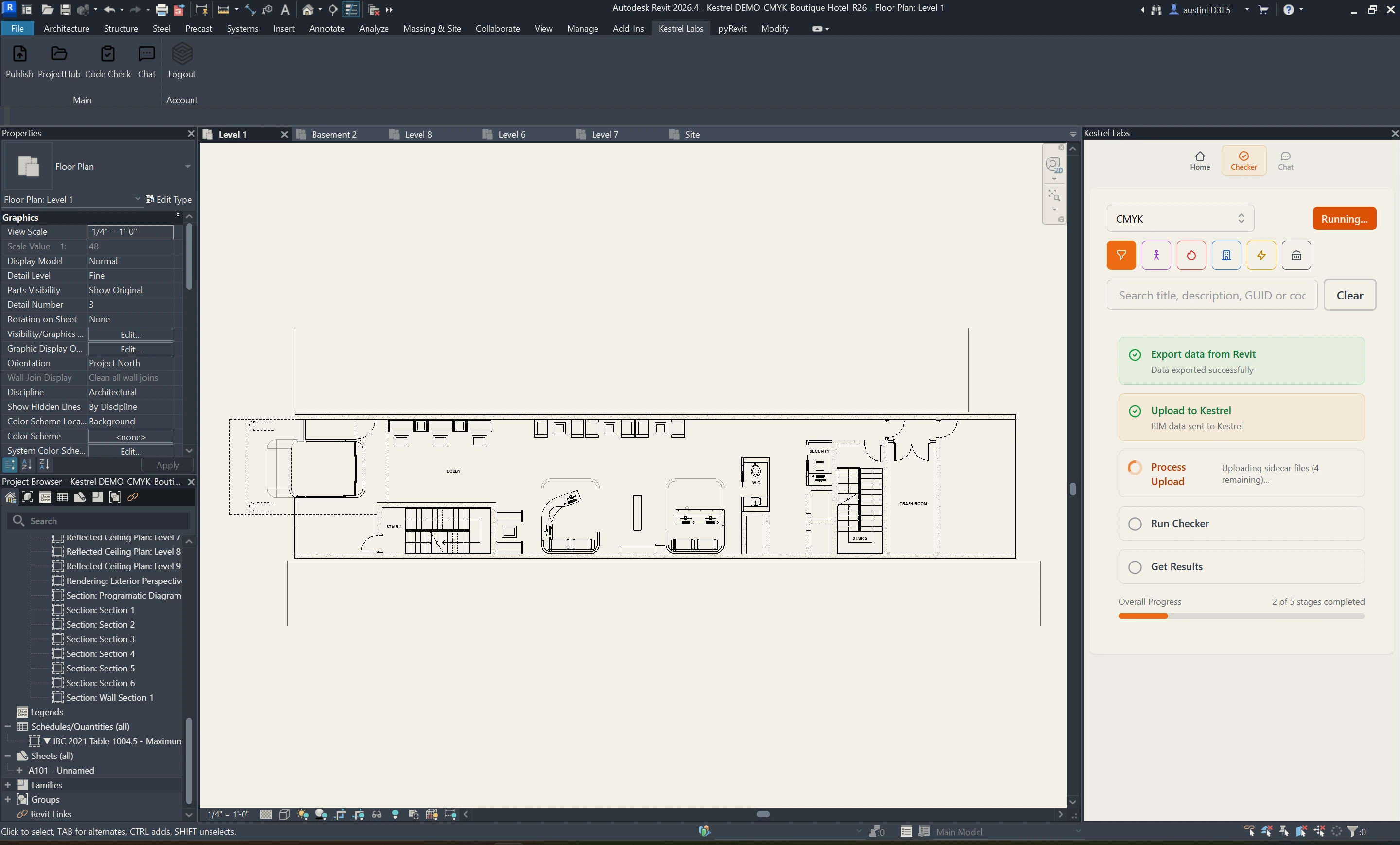
A checklist of redlines, before anyone is redlining. Every check runs against the live model, in Revit or on a model shared through Autodesk Forma, and lands on the element involved.

Kestrel running inside Revit on a building floor plan — the BIM model on the left, and the Kestrel Compliance Analysis sidebar on the right listing live building code violations against the model.
  1. 01

    Runs in Revit + Forma

    Run the check where the drawings are being made. No stopping to print a set, no exporting to another tool, no vetting someone else's comments. Or run it on the Forma model from the portal, with no Revit session at all.

  2. 02

    Right Codes

    Kestrel reads your model to determine project type, location, occupancy, and sprinklering, then proposes the applicable codes. You review and confirm before every check.

  3. 03

    Mapped Issues

    Every result is tied to a specific element in your model. Click it and Revit takes you there. The things that are hard to see on a plan, a dead-end corridor, an unrated door in a rated wall, show up where they are.

  4. 04

    Cited References

    Each result carries the code section it comes from and an explanation written from licensed ICC text. You see what's wrong and why, with the reference ready when you need to defend a decision to a client or a jurisdiction.

[ Kestrel // Revit live check ]

Basement 02 · IBC 2024 · Frame 01

Signal, Not Noise

[01]

A checker that calls every unknown a violation costs you time instead of saving it. Kestrel reports what failed, what passed, what is exempt, and what it could not evaluate, each on its own, so a long list reads as a few problems to work.

Insufficient Information

[02]

When the model does not carry the data a rule needs, a room with no occupancy or a wall with no rating, Kestrel says so and names the parameter. It does not manufacture a failure.

Dismiss With a Reason

[03]

An approved variance is not a violation. Dismiss it with a note and it leaves the report, with the reason on the record for the life of the project, visible to everyone on it.

Run History

[04]

Every run is logged with who ran it and what changed: new, resolved, returned. Watch the count come down as the design takes shape. A record a QA lead can stand behind.

Revit + Forma + Browser

[05]

Run from the add-in, or from the portal on a model shared through Autodesk Forma. Review results on the 3D model in the browser, or export the report as a PDF. The same element IDs on every surface.

Compliance Chat

[06]

Ask why a result failed or what would resolve it. Chat already knows the project, the code cycle, and the result on screen, and answers from licensed ICC text with the section cited. Not a web search.

Kestrel doesn't replace your judgment. It gives you something worth judging.

[ Now Rolling Out ]

From code check to continuous compliance

The Kestrel platform is evolving into a system that keeps watch across your projects. Two new capabilities make that possible.

The Kestrel web portal: an isometric 3D view of a boutique hotel model with a flagged element marked, beside the checker results list showing five open items including ADA toilet clear floor space and door fire rating vs wall rating.

[ Kestrel // Portal · Results on the model ]

Boutique hotel · IBC 2021 · 5 open items

3D Model Review in the Browser

[01]

See every violation in 3D, without launching Revit

Share your model through Autodesk Forma and open it in the Kestrel web portal. See exactly where each violation sits in 3D and investigate without launching Revit. The features you know from Kestrel in Revit come along: element-ID navigation, code citations, contextual chat, and issue dismissal. Compliance is now visible to everyone on the project, not just the person in the model.

Scheduled Compliance Checks

[02]

No more relying on someone to remember

Run your checks on a schedule and deliver results straight to the people accountable for design quality. Principals, technical directors, and QA/QC leads get visibility across projects without chasing their teams for updates.

The Autodesk Forma cloud checks panel in the Kestrel portal: a linked Revit cloud model, version and phase selectors, and a Run cloud check button.

[ Kestrel // Portal · Autodesk Forma cloud checks ]

Run from the browser · no Revit session

A violation opened in the Kestrel web portal: ADA toilet clear floor space, with the explanation citing ICC A117.1 section 604.3, the individual result for the fixture in room W.C, and buttons to show it on the model, read the references, explain, or dismiss. Below, the run history shows what is new, resolved, and returned.

[03]

Open a violation

The element, the explanation, and the section it comes from. Show it on the model, read the references, or dismiss it with a reason. Every run logs what's new, what's resolved, and what came back, so the next review starts from the record, not from scratch.

[ Kestrel // Portal · ADA toilet clear floor space · ICC A117.1 §604.3 ]

Rolling out to a select group of early customers.

Want to see it live? Schedule a demo

[ Coverage ]

What Kestrel checks

Kestrel checks compliance across key regulatory categories, applied in context to your BIM model.

Height + Area

[01]

Allowable building height and area, frontage conditions, sprinkler impacts, mezzanine relationships, and construction-type implications.

Construction Type

[02]

Type I–V classification logic, allowable assemblies, structural fire-resistance assumptions, and construction-related compliance constraints.

Occupancy Classification

[03]

Primary use, mixed-occupancy conditions, occupant load assumptions, control areas, and separation logic between occupancy groups.

Means of Egress

[04]

Required exits, travel distance, dead-end limits, corridor and stair geometry, door clearances, discharge paths, and occupant movement requirements.

Fire + Life Safety

[05]

Fire-resistance ratings, occupancy separations, opening protectives, shafts, smoke-control conditions, and related life-safety requirements.

Accessibility

[06]

Accessibility scoping, accessible routes, turning radii, clear floor space, reach ranges, fixture clearances, and circulation requirements.

Energy + Performance

[07]

Energy-code conditions, envelope performance requirements, lighting and mechanical coordination, and environmental compliance layers.

Site + Environmental

[08]

Wildfire overlays, flood and seismic conditions, hillside constraints, stormwater requirements, and site-specific environmental triggers.

Zoning + Jurisdictional

[09]

Local amendments, overlay districts, planning conditions, density and setback requirements, parking logic, and jurisdiction-specific review conditions.

[ How It Works ]

From first check to first-pass compliance

Kestrel checks your BIM model continuously throughout design — not just once before submission. Issues surface early. You resolve them while there's still room to move.

Running ~30 seconds per pass
  1. Identify

    [01]

    Kestrel reads your BIM model to determine project type, location, occupancy, and sprinklering. It proposes the applicable codes. You review and confirm before anything runs.

  2. Check

    [02]

    Kestrel runs a compliance check directly on your BIM model, against the requirements for your project type and jurisdiction. About 30 seconds, start to finish. No PDF, no export.

  3. Map

    [03]

    Kestrel shows what passes and what doesn't, tied to specific elements in your model. Every issue links to the code behind it. You know exactly what to fix and why.

  4. Track

    [04]

    Each run is saved to the project history with what is new and what was resolved. Run a check after changes. Run another after the next round. Or let the schedule run it, from Revit or from Autodesk Forma. Watch violation counts drop as the design takes shape.

[ Built For Teams ]

Two views for compliance coverage

Designers work inside the model. Project leaders need to know where things stand — without opening Revit.

Kestrel Compliance Analysis open inside Revit on a floor plan, with the side panel expanded on an IBC 2021 Table 716.1(2) door fire rating violation.

For Designers

[01]

Inside the model, as you design

Run compliance checks directly in your BIM model as you design. Catch issues early. Adjust quickly. Move forward with a clear picture of where you stand. Every violation links back to the element it came from and the code section behind it. The check takes about 30 seconds. Run one as often as your design changes.

The Kestrel portal with the model colored by result: a sectional 3D view of the hotel with an accessible work surface height violation in the staff lounge, beside the checker results panel showing 1,759 results.

For PMs + Principals

[02]

Above the model, in the portal

Stay out of the model and still in the loop. Open the model shared through Autodesk Forma in your browser, color it by result, and see where issues remain. Confirm readiness before the set goes out. Each run creates a record of progress. You're not reviewing drawings. You're reviewing where the project stands.

[ FAQ ]

Frequently asked

The short answers. Reach out if you want the long ones, or anything not here.

[01]

How does Kestrel check compliance in a BIM model?

Kestrel is the first BIM-native structured compliance data layer for the built environment. It deterministically checks your BIM model against applicable building code requirements for your project type and location, identifying issues tied to specific elements in your design and linking each one to the relevant code reference.

[02]

Will it just add noise?

No. Kestrel separates what failed from what it could not check. Every result is one of four things: a violation, a pass, an exemption, or insufficient information, which means the model does not carry the data the rule needs, like a room with no occupancy assigned. Results are grouped by category, and anything that is not a real issue can be dismissed with a reason that stays on the record. The first run on a project usually has more insufficient-information results than violations. Fill in the missing parameter once and they clear.

[03]

What does Kestrel find that a manual review misses?

The things that are hard to see on a plan. An unrated door in a rated wall. A stair an inch under the minimum width. A drinking fountain short of the required count. A room drawn as one occupancy and scheduled as another. In testing on live projects, Kestrel has caught issues that had already passed a manual QA/QC round. It also reads the whole model every time, which a reviewer with a few days and a 600-sheet set cannot.

[04]

Which codes and jurisdictions does Kestrel support?

Kestrel is built on official code data through our collaboration with the International Code Council (ICC), applied based on your project type and location. We are actively expanding jurisdictional coverage. If you want to confirm coverage for a specific jurisdiction, schedule a demo.

[05]

Does Kestrel support NFPA 101 and the IECC?

Both are in development. NFPA 101 (the Life Safety Code) and the International Energy Conservation Code are two of the most referenced standards in architectural practice, and Kestrel recognizes that. We are actively working to incorporate them. When they are available, we will let you know. If coverage matters for a project you have right now, bring it to the demo and we will be straight with you about where things stand.

[06]

Is Kestrel a replacement for architect code review?

No. Kestrel runs a first-pass compliance check to surface issues early, and Kestrel Compliance Chat explains how requirements apply. Final interpretation, professional judgment, and design decisions stay with the architect. Kestrel takes the tedious work off your plate — not the decisions.

[07]

How often should you run checks?

As often as your design changes. Kestrel is built for continuous use. Each one-click compliance check takes about 30 seconds. Run one after a design review. Before a client meeting. While testing options. As often as you want to build confidence in your decisions. The earlier issues surface, the easier they are to resolve.

[08]

Can the team use Kestrel without working in Revit?

Yes. Designers run checks inside Revit. Project managers, principals, and project leads review compliance status, violation counts, and progress in the Kestrel portal — no BIM file required. The same check feeds both views.

[09]

How is Kestrel different from plan review or permitting software?

Plan review software checks static PDFs after the design is final. Kestrel checks the live BIM model while you're designing it. Catching an egress issue early is a wall you move in five minutes. Catching it at plan review means unwinding everything built on top of it — the corridor, the room layouts, the door schedule, the sheets.

[10]

What is Kestrel Compliance Chat?

Kestrel Compliance Chat is an AI building code assistant that answers project-specific code questions using your BIM model, jurisdiction, and applicable regulations. It runs inside Revit or in your browser. Every answer cites the exact code section behind it. Kestrel Compliance Chat and Compliance Analysis work together. The analysis identifies violations. Kestrel Compliance Chat explains the requirement, how it applies, and what changes would resolve it.

[11]

How is Kestrel Compliance Chat different from Compliance Analysis?

Compliance Analysis runs against your BIM model and surfaces every code issue in your design. Kestrel Compliance Chat answers questions. Ask it why an issue failed, what would fix it, or how a code requirement applies to your specific project conditions. They use the same project data. They solve different problems.

[12]

What does the Autodesk Forma integration do?

It runs the check without opening Revit. Share your model through Autodesk Forma, link it to your Kestrel project, and run the check from the portal. The run happens in the cloud, so no one’s Revit session is tied up. Results land in the same project history as a desktop run, on the same element IDs. Rolling out to early customers now.

[13]

How do scheduled compliance checks work?

Set the cadence, and the results arrive. Run checks on a schedule, or around design milestones, and deliver the violations report straight to the people accountable for design quality: principals, technical directors, QA/QC leads. No more relying on someone to remember. Rolling out to early customers now.

[14]

Can I review results without opening Revit?

Yes, on the 3D model in your browser. Open the results in the Kestrel web portal and see exactly where each violation sits in 3D. Element-ID navigation, code citations, contextual chat, and issue dismissal come along from Revit. Compliance is visible to everyone on the project, not just the person in the model.